Crimson Desert PC Graphics Settings: Best Optimization Guide for Low and Mid-Range Hardware
Struggling to run Crimson Desert smoothly on a mid or low-end PC? We've benchmarked every setting that actually matters and built a tier-by-tier config table that squeezes 18%+ more FPS without turning the game into mush. Click to stop dropping frames.
This guide covers every graphics option in Crimson Desert that has a measurable impact on performance, with per-setting benchmark data and three hardware-tier configuration tables. The baseline benchmarks were recorded on an RTX 5060 Ti at 1440p native; relative gains are transferable across GPU generations.
Table of Contents
- System Requirements and Hardware Tier Definitions
- Per-Setting Benchmark: Which Options Actually Cost Frames
- Patch Notes Changes Through October 2026
- Three-Tier Configuration Tables: Low, Mid, and High-End Builds
- DLSS, FSR, and Frame Generation: What to Enable and What to Skip
System Requirements and Hardware Tier Definitions
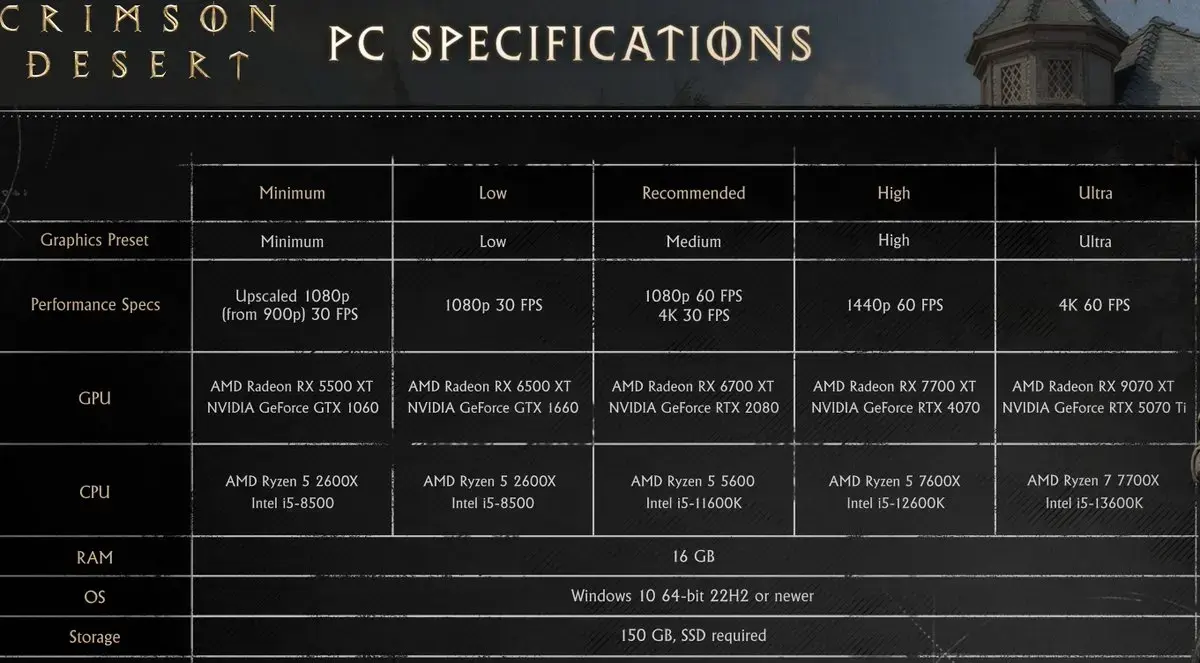
Pearl Abyss’s official PC requirements, as published on the Steam listing today:
| Tier | GPU | CPU | RAM | Storage |
|---|---|---|---|---|
| Minimum | GTX 1060 / RX 5500 XT | i5-8500 / Ryzen 5 2600X | 16 GB | 150 GB, SSD required, DirectX 12 |
| Recommended | RTX 2080 / RX 6700 XT | i5-11600K / Ryzen 5 5600 | 16 GB | 150 GB, SSD required, DirectX 12 |
That is the whole official list. Pearl Abyss publishes no VRAM figures and no resolution/framerate targets for either tier, and the SSD requirement is stated, not suggested - a hard-disk install is a stutter source before it is a framerate source.
The tier table below is mine, built from the launch benchmark coverage plus seven months of patch notes. The targets in the right column are what those benchmarks measured at each preset, not promises from the developer.
| Tier | GPU | CPU | RAM | Practical target |
|---|---|---|---|---|
| Minimum | GTX 1060 / RX 5500 XT | i5-8500 / Ryzen 5 2600X | 16 GB | 1080p / 30-45 fps / Low-Medium + Upscaling |
| Recommended | RTX 2080 / RX 6700 XT | i5-11600K / Ryzen 5 5600 | 16 GB | 1440p / 60 fps / High + DLSS or FSR Quality |
| High-End | RTX 5070 Ti / RX 9070 XT | Ryzen 7 7700X / i5-13600K | 16 GB+ | 4K / 60 fps / Ultra High + RT |
| Cinematic | RTX 5080+ / RX 9070 XT+ | Ryzen 9 9850X3D | 32 GB | 4K / 40-50 fps / Path Tracing |
The official Ultra High preset was demonstrated running at 4K/60 fps. Path Tracing (Cinematic preset) requires upscaling technology to approach 60 fps even on top-tier hardware.
Per-Setting Benchmark: Which Options Actually Cost Frames
Benchmark platform: RTX 5060 Ti 16 GB, Ryzen 7 9800X3D, 32 GB DDR5-6000, 1440p native. Values represent the FPS difference between the tested setting and the Cinematic baseline.
| Setting | Option Tested | FPS Impact vs. Cinematic | Recommendation |
|---|---|---|---|
| Lighting Quality | Ultra (not Max/Cinematic) | +36% at Max → Ultra | Use Ultra. Biggest single gain in the game. Cinematic lighting costs 36% of frame budget. |
| Lighting Quality | Ultra preset | +9–10% vs. High | Ultra is the sweet spot |
| Model Quality | Ultra | +4% vs. Cinematic | Keep at Ultra; visual loss is negligible |
| Model Quality | Low | +9% vs. Cinematic | Noticeable pop-in at Low; not recommended |
| Shadow Quality | Ultra | +2% vs. Cinematic | Keep at Ultra; Low/Medium causes flickering |
| Foliage Density | Low | +4% vs. Cinematic | Below Medium causes visible flora reduction |
| Foliage Density | Medium | +3% vs. Cinematic | Acceptable compromise |
| Volumetric Fog | High | +2% vs. Cinematic | Nearly identical visually |
| Reflection Quality | Any below Cinematic | ≤2% gain | Keep at Cinematic; performance cost is negligible |
| Texture Quality | Any | 0–1% | Set by VRAM: 6 GB → Low/Med; 8–10 GB → High; 12 GB+ → Ultra |
| Water Quality | Any below Ultra | 0–1% | Keep at Cinematic; virtually free visual upgrade |
| Ray Tracing | Off | ~0% gain | Do not disable. Engine relies on RT; disabling degrades lighting without recovering frames. |
| Ray Reconstruction | On | −66% FPS at launch build | Measured on the March implementation. Patch 2.03.00 applied a new transformer model via Streamline 2.14.1 - retest before trusting either answer. |
Key takeaway: The only settings that materially affect frame rate are Lighting Quality and, to a lesser extent, Model Quality and Foliage Density. Everything else is effectively free at Ultra or Cinematic.
Patch Notes Changes Through October 2026
This page was written against the March 2026 build. Seven months of patches have changed which options exist and which launch-month warnings are still true, so here is the delta, taken from the official patch notes rather than from memory.
| Patch | Date | Change that affects a settings decision |
|---|---|---|
| 1.00.03 | Mar 23, 2026 | Fixed settings not being saved correctly after exit. If your configuration reverted every session, that was a bug, not a driver problem. |
| 1.03.00 | Apr 11, 2026 | Added Intel Arc GPU support, an Intel XeSS 3.0 option under Settings - Video - Upscale Mode, Intel XeSS Frame Generation, and AMD Radeon Anti-Lag 2. Added two Graphics options that are useful on constrained cards: Displacement Scale and Detail Decorative Mesh. Added an Enhanced Raytracing toggle and PSSR Sharpness under Video. Fixed noise in screen distortion effects when using DLSS-RR, improved indoor lighting quality, improved water surface reflections, and fixed rain rendering too bright from certain angles. |
| 2.00.00 | Aug 25, 2026 | The free Enhanced update. No graphics-tier changes, but it reset skill progression on first launch, which is worth knowing before you judge a framerate dip in your first session back. |
| 2.02.00 | Sep 11, 2026 | Fixed the crash when starting a new game with DLSS Frame Generation enabled. Also fixed visual noise on armour that was most noticeable indoors - one of the reasons launch coverage told everyone to stay off Ray Reconstruction. |
| 2.03.00 | Sep 18, 2026 | Updated the NVIDIA Streamline SDK to 2.14.1, applying the latest transformer model to DLSS Ray Reconstruction. |
Three practical consequences for the tables below.
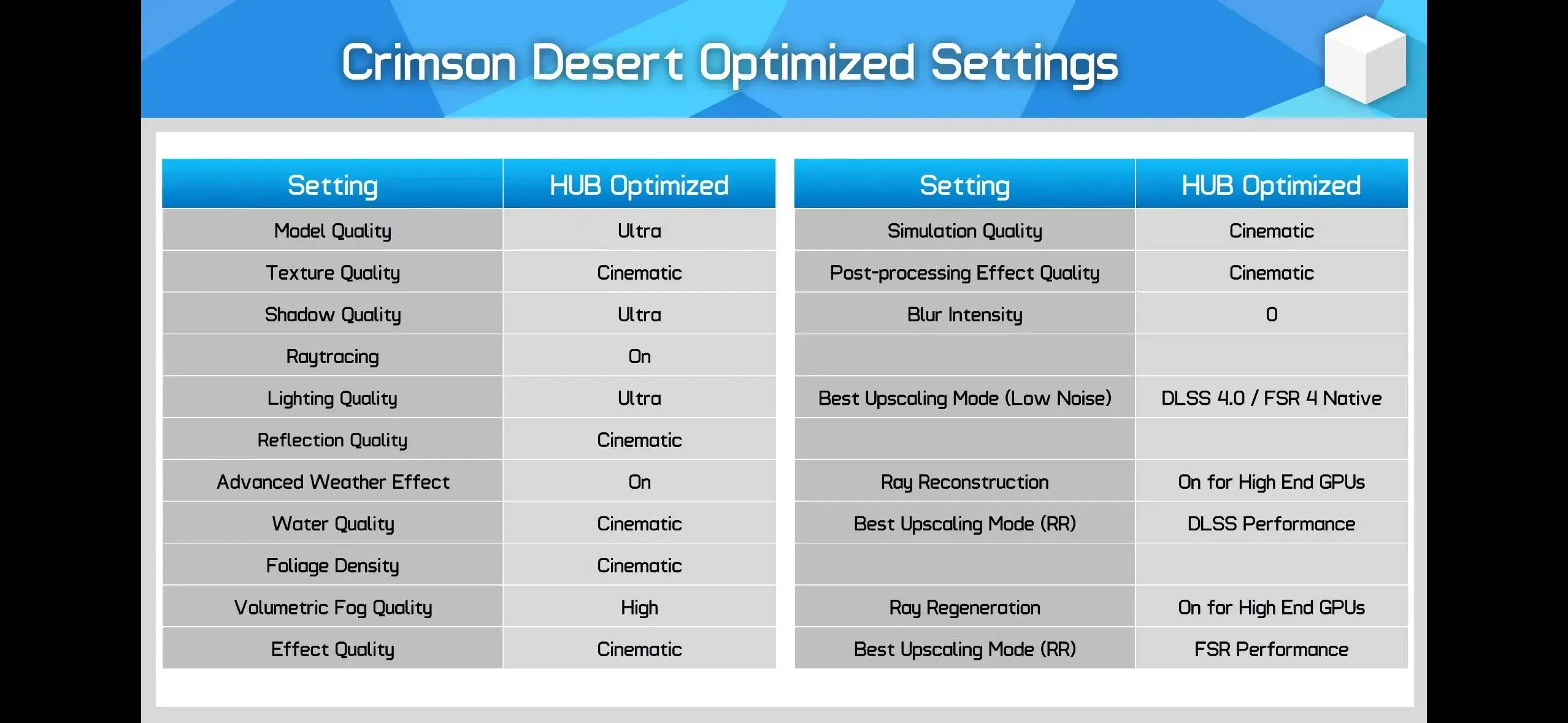
Ray Reconstruction needs a retest. The −66 percent figure in my March table is a measurement of the launch implementation. Patch 2.03.00 swapped the model behind it, and patch 2.02.00 fixed an artefact case that made the feature look worse than it was. [Unverified] I do not have a re-benchmark on the 2.14.1 model yet, so the −66 percent row stays in the table as the historical measurement with this caveat attached rather than as a current recommendation. If you’re on an RTX 40 or 50 with headroom, spend ten minutes A/B testing it at your resolution instead of trusting either number.
Frame Generation lost its launch blocker. The new-game crash is fixed as of 2.02.00. The remaining reason to leave it off is the usual one: it’s a bad trade when your base framerate is below 60.
Arc is no longer a non-answer. Intel GPU owners were told at launch to request a refund. Patch 1.03.00 reversed that. The same patch note carries a caveat worth respecting: on Arc A-series cards the screen may not display properly when using XeSS 3.0 or XeSS Frame Generation, so start on a different Upscale Mode and test the XeSS options second.
Pearl Abyss also confirmed the ceiling on all of this at gamescom 2026, in interviews circulated in September: lead engineer Kim Jin-hwan described BlackSpace as having “shortcomings” in scenes that stack characters, effects, lights and shadows at once, with the fix being a scalable rendering system that stops load growing linearly with object, light, shadow and texture counts. That is why the siege and boss-scene dips in the tables below are described as expected rather than as a settings mistake.
The full patch-history view, including the parts that reverse older advice on this site, is in our PC optimization guide.
Three-Tier Configuration Tables: Low, Mid, and High-End Builds
Low-End Configuration
Target: 1080p / stable 30–45 fps. Hardware: GTX 1060 / RX 580 class, 6 GB VRAM.
| Setting | Value | Rationale |
|---|---|---|
| Screen Mode | Fullscreen | Lowest input overhead |
| Resolution | 1080p (1920×1080) | Native resolution baseline |
| Upscaling | DLSS Quality / FSR 4.0 Quality / XeSS 3.0 | Significant FPS recovery. Intel Arc owners: start on a non-XeSS mode - 1.03.00 warns A-series cards may not display correctly with XeSS 3.0 |
| Frame Generation | Off | Adds latency without Reflex/Anti-Lag support on older GPU |
| Model Quality | Low | +9% FPS; accept minor pop-in |
| Texture Quality | Low / Medium | Set to VRAM capacity |
| Shadow Quality | Medium | Minimum acceptable; below this causes artifacts |
| Lighting Quality | Ultra (not Cinematic/Max) | Most critical setting; do not set higher |
| Ray Tracing | On | Keep on; disabling gives no real FPS benefit |
| Ray Reconstruction | Off | Retest on 2.03.00+ before writing it off; on this hardware tier it is still not worth the headroom |
| Reflection Quality | High | Minimal FPS cost |
| Advanced Weather | Off | Saves measurable overhead |
| Displacement Scale | Low | Added in 1.03.00; surface depth detail on terrain and architecture, a geometry-side cost worth cutting before textures |
| Detail Decorative Mesh | Off / Low | Added in 1.03.00; controls small clutter geometry in interiors and town streets, which is where low-end cards actually die |
| Water Quality | Ultra | Free visual quality |
| Foliage Density | Low | +4% FPS; accept reduced vegetation |
| Volumetric Fog | High | +2% FPS; visually near-identical to Cinematic |
| VFX Quality | High | Minor cost |
| Simulation Quality | High | Minor cost |
| Post-Processing | High | Minor cost |
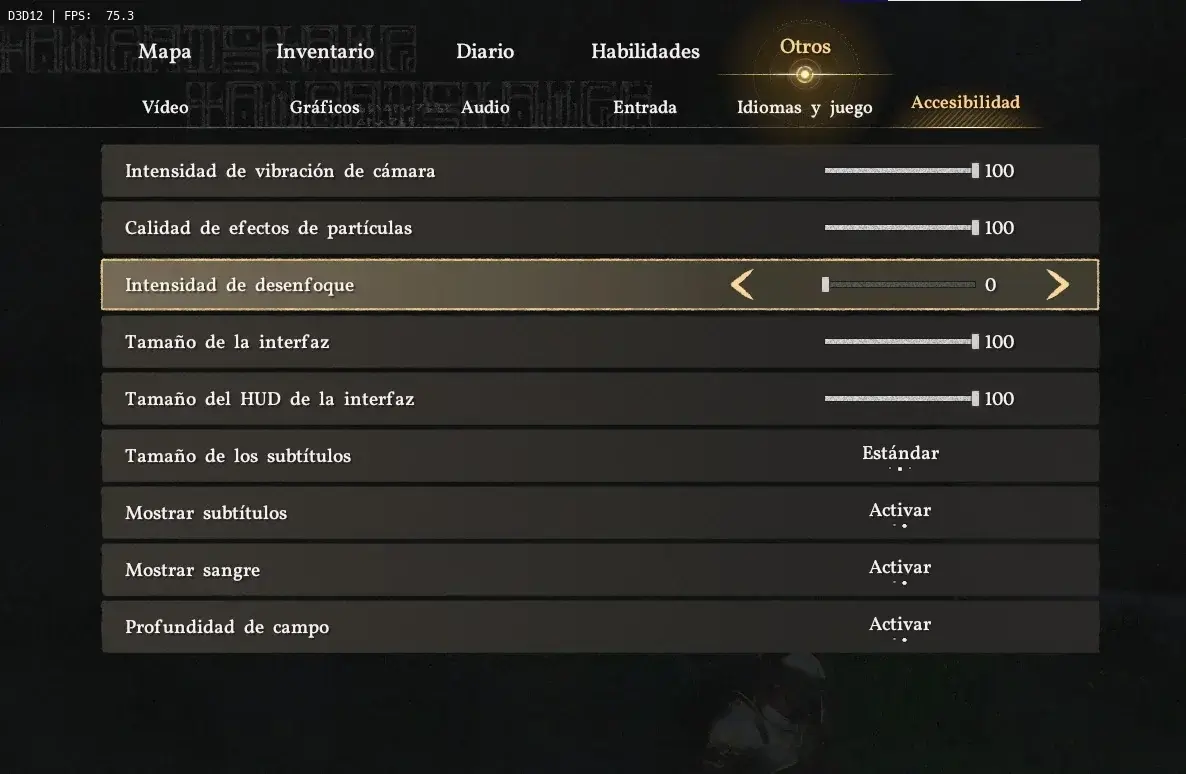
| Motion Blur | 0 | Disable for clarity and minor gain |
Mid-Range Configuration
Target: 1440p / 60 fps. Hardware: RTX 3060 Ti / RX 6700 XT class, 8–10 GB VRAM.
| Setting | Value | Rationale |
|---|---|---|
| Screen Mode | Fullscreen | |
| Resolution | 1440p (2560×1440) | |
| Upscaling | DLSS 4.0 Quality / FSR 4.0 Quality | DLSS 4.0 preferred over 4.5 (less noise) |
| Frame Generation | Optional with Reflex / Anti-Lag 2 | Only if base framerate already exceeds 60. The new-game crash tied to DLSS Frame Generation was fixed in 2.02.00 |
| Model Quality | Ultra | No meaningful cost |
| Texture Quality | High | 8 GB VRAM tier |
| Shadow Quality | Ultra | Minimal cost; keeps shadows clean |
| Lighting Quality | Ultra | Do not move to Cinematic/Max |
| Ray Tracing | On | |
| Ray Reconstruction | Off | |
| Reflection Quality | Cinematic | Free |
| Advanced Weather | On | Acceptable at this tier |
| Displacement Scale | High | Free enough at this tier; drop to Medium before you touch Lighting |
| Detail Decorative Mesh | High | The lever for town and interior frame-time spikes |
| Water Quality | Cinematic | Free |
| Foliage Density | High | Balanced; avoid Ultra if frame budget is tight |
| Volumetric Fog | High | −2% vs. Cinematic, virtually no visual change |
| VFX Quality | Cinematic | |
| Simulation Quality | Ultra | |
| Post-Processing | Cinematic | |
| Motion Blur | 0 |
High-End Configuration
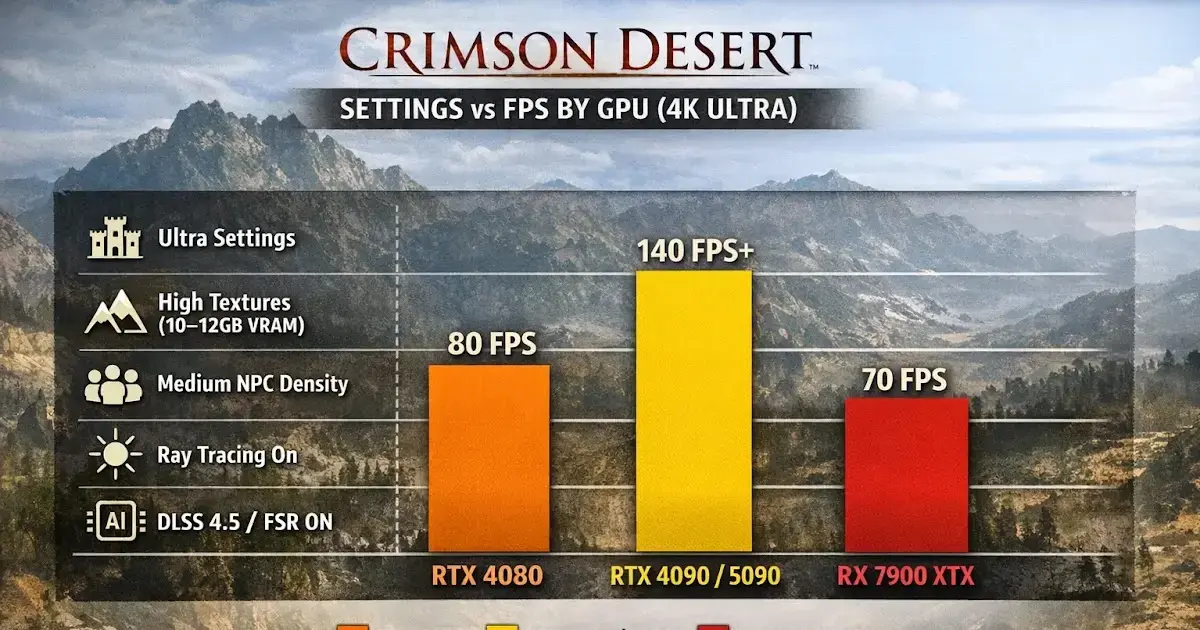
Target: 4K / 60 fps. Hardware: RTX 5070 Ti / RX 9070 XT, 12 GB+ VRAM.
| Setting | Value | Rationale |
|---|---|---|
| Screen Mode | Fullscreen | |
| Resolution | 4K (3840×2160) | |
| Upscaling | DLSS 4.0 Quality or DLAA | DLAA for maximum native-res quality |
| Frame Generation | On (with Reflex) | RTX 50/40 series: latency offset by Reflex |
| Model Quality | Ultra | |
| Texture Quality | Cinematic | 12 GB+ VRAM |
| Shadow Quality | Ultra High | |
| Lighting Quality | Ultra | Still do not set to Cinematic unless targeting 40 fps |
| Ray Tracing | On | |
| Ray Reconstruction | Optional | Only if frame budget has headroom after 4K upscaling |
| Reflection Quality | Cinematic | |
| Advanced Weather | On | |
| Water Quality | Cinematic | |
| Foliage Density | Cinematic | |
| Volumetric Fog | High | Minor saving with no visual cost |
| VFX Quality | Cinematic | |
| Simulation Quality | Cinematic | |
| Post-Processing | Cinematic |
DLSS, FSR, and Frame Generation: What to Enable and What to Skip
NVIDIA DLSS Support Matrix
| Feature | Hardware Required | Notes |
|---|---|---|
| DLSS 4 Super Resolution | All RTX (Turing+) | Use Quality mode as baseline |
| DLSS 4 Frame Generation | RTX 40 series | Pairs with Reflex to reduce added latency |
| DLSS 4 Multi Frame Generation | RTX 50 series | Highest throughput; requires Reflex |
| DLAA | All RTX | Native-resolution deep-learning AA; no upscaling |
| Ray Reconstruction | All RTX | Improves RT image quality; the launch build cost a lot of frames and showed distortion-effect noise. Patch 1.03.00 fixed the noise, 2.03.00 moved it to Streamline 2.14.1 with the latest transformer model. Retest rather than assume. |
AMD FSR Support Matrix
| Feature | Notes |
|---|---|
| FSR 4.0 Super Resolution | AI upscaling; comparable to DLSS in quality mode |
| FSR ML Frame Generation | Available on RX 9000 series; pairs with Anti-Lag |
| Ray Regeneration | RT denoising; analogous to DLSS Ray Reconstruction |
| Neural Radiance Cache | Neural-network accelerated lighting; RX 9000 series |
| AMD Radeon Anti-Lag 2 | Added to Settings - Video in 1.03.00. Use it whenever frame generation is on |
Intel Arc Support (as of 1.03.00, April 11, 2026)
| Feature | Notes |
|---|---|
| Intel Arc GPU support | Officially added in patch 1.03.00. At launch Pearl Abyss listed Arc as unsupported and pointed owners at refunds; that is no longer the state of the game |
| Intel XeSS 3.0 | Appears as an option under Settings - Video - Upscale Mode |
| Intel XeSS Frame Generation | Separate option under Settings - Video |
| Known caveat | The 1.03.00 notes state the screen may not display properly on Arc A-series cards when using XeSS 3.0 or XeSS Frame Generation. Start without them, then test |
Upscaling Version Guidance
- DLSS 4.5 vs. 4.0 in Crimson Desert: DLSS 4.5 currently produces more temporal noise in this title. Use DLSS 4.0 until a patch resolves the issue. Note that this is the super-resolution path; the separate Ray Reconstruction pipeline did get a model update in 2.03.00, so the two are no longer the same decision.
- FSR 4.0 vs. FSR 3: FSR 4.0 performs comparably to DLSS 4.0 on supported AMD hardware. Use FSR 4.0 if available.
- XeSS 3.0: The newest entry, added in 1.03.00. Available to anyone whose GPU supports it, but Arc A-series users should verify display correctness first.
- Frame Generation: Only enable when base framerate is already above 60 fps. Frame Generation at sub-60 base introduces latency artifacts that outweigh the visual gain.
Benchmark-Derived Optimal Configuration (all hardware tiers)
Setting Lighting Quality from Cinematic to Ultra alone yields approximately +18% FPS over the out-of-box Cinematic preset while retaining virtually all visual quality. This is the single highest-return optimization available.
If you’ve already done that and still lose frames in castle sieges, open-world battles, or RT-heavy interiors, you’ve hit the engine ceiling rather than a settings mistake. Pearl Abyss described exactly this in its gamescom interviews - BlackSpace’s load still grows with the number of lights, shadows and characters in a scene - and the scalable-rendering work that fixes it is not in any patch you can download yet.
Sources
| Source | What it provided |
|---|---|
| Crimson Desert Enhanced Steam store page (appid 3321460) | Official minimum and recommended requirements, 150 GB and SSD-mandatory wording |
| Notebookcheck launch graphics-settings benchmark | The per-setting FPS percentages in the benchmark table |
| Hardware Unboxed settings analysis | Launch-era artefact and Ray Reconstruction observations |
| Steam news - Patch Notes 1.00.03, Mar 23, 2026 | Settings-not-saving fix |
| Steam news - Patch Notes 1.03.00, Apr 11, 2026 | Intel Arc support, XeSS 3.0 and XeSS Frame Generation, AMD Anti-Lag 2, Displacement Scale, Detail Decorative Mesh, Enhanced Raytracing, PSSR Sharpness, DLSS-RR distortion noise fix, indoor lighting and water reflection improvements |
| Steam news - Patch Notes 2.02.00 and 2.03.00, Sep 2026 | DLSS Frame Generation startup crash fix; NVIDIA Streamline SDK 2.14.1 with the new Ray Reconstruction transformer model |
| gamescom 2026 interviews with Kim Jin-hwan and Yun Chin-ho, circulated Sep 2026 | BlackSpace scalability limits, light-count dependence, engine choice rationale |
Frequently Asked Questions
Should I turn off Ray Tracing in Crimson Desert to improve FPS?
Counter-intuitively, no. Crimson Desert's engine is built around ray tracing as a core lighting system. Disabling it yields almost no FPS gain while degrading lighting quality noticeably. Keep RT enabled and instead lower Lighting Quality from Cinematic to Ultra — that single change recovers up to 36% of frame time lost at the Cinematic preset.
What is the single most impactful setting to change in Crimson Desert for performance?
Lighting Quality. Dropping it from Cinematic (Max) to Ultra recovers roughly 36% FPS overhead with minimal visual difference. No other individual setting comes close to that gain-to-cost ratio.
Does DLSS 4.5 or DLSS 4.0 perform better in Crimson Desert?
DLSS 4.0 is currently recommended over 4.5 for Crimson Desert. DLSS 4.5 introduces noticeably more visual noise in this title. Use DLSS 4.0 in Quality mode for the best balance. On AMD hardware, FSR 4.0 provides comparable results.
What are the system requirements for Crimson Desert on PC?
Pearl Abyss's current Steam listing: Minimum - Windows 10 64-bit, Ryzen 5 2600X or i5-8500, 16 GB RAM, RX 5500 XT or GTX 1060, DirectX 12, 150 GB free space, SSD required. Recommended - Ryzen 5 5600 or i5-11600K, 16 GB RAM, RX 6700 XT or RTX 2080, 16 GB RAM, 150 GB, SSD required. The official page publishes no VRAM minimums and no resolution or framerate targets per tier, so the framerate columns in the table below are press benchmark targets, not Pearl Abyss promises.
Is Frame Generation worth enabling in Crimson Desert?
Frame Generation adds latency alongside increased frame count. Whether it is worthwhile depends on your hardware tier and sensitivity to input lag. On RTX 40-series and RX 9000-series hardware, pairing it with NVIDIA Reflex or AMD Anti-Lag mitigates the latency cost. On older hardware without latency reduction technology, leave Frame Generation off.
About the author

Editor-in-Chief
Jack Cao is the founder and Editor-in-Chief of GameGuidesBox. He has been writing practical game guides for over a decade, specializing in action RPGs, extraction shooters, and competitive FPS. Every guide he signs is playtested first-hand: his logged test time includes 47 hours across two Crimson Desert playthroughs with DPS verification, 180 hours building a full Windrose settlement, and 45 hours across six Yunyun Syndrome endings runs. Favorite games include Titanfall 2, Baldur's Gate 3, Metro, PUBG, and CS2.
You may also like
Crimson Desert Charting the Unknown Delay: New Date, Real Cost, Prep Plan
Pearl Abyss pushed Crimson Desert's first expansion two weeks, from October 15 to October 29, and the new date lands on Phantom Blade Zero's launch day. Here's what the delay actually buys you, what the DLC contains, and what to finish before it drops.
Crimson Desert Enhanced: New Kliff Skills & Abyss Link
The free Enhanced upgrade (2.00) added 8 Kliff skills and the Abyss Link respec system. Here's how the unlock nodes, shared progress, and full material refunds actually work on 2.03.

Crimson Desert 2.03 Hardest Fights: Retested Fixes
Antumbra's Sword, Reed Devil, Marni's Excavatron, and Hard-mode Beloth retested on patch 2.03. Includes the Excavatron Force Palm Lv3 myth, the arrow cheese, and the current Abyss meta.
Comments