Crimson Desert PC Graphics Settings: Best Optimization Guide for Low and Mid-Range Hardware
Struggling to run Crimson Desert smoothly on a mid or low-end PC? We've benchmarked every setting that actually matters and built a tier-by-tier config table that squeezes 18%+ more FPS without turning the game into mush. Click to stop dropping frames.
This guide covers every graphics option in Crimson Desert that has a measurable impact on performance, with per-setting benchmark data and three hardware-tier configuration tables. The baseline benchmarks were recorded on an RTX 5060 Ti at 1440p native; relative gains are transferable across GPU generations.
Table of Contents
- System Requirements and Hardware Tier Definitions
- Per-Setting Benchmark: Which Options Actually Cost Frames
- Three-Tier Configuration Tables: Low, Mid, and High-End Builds
- DLSS, FSR, and Frame Generation: What to Enable and What to Skip
System Requirements and Hardware Tier Definitions
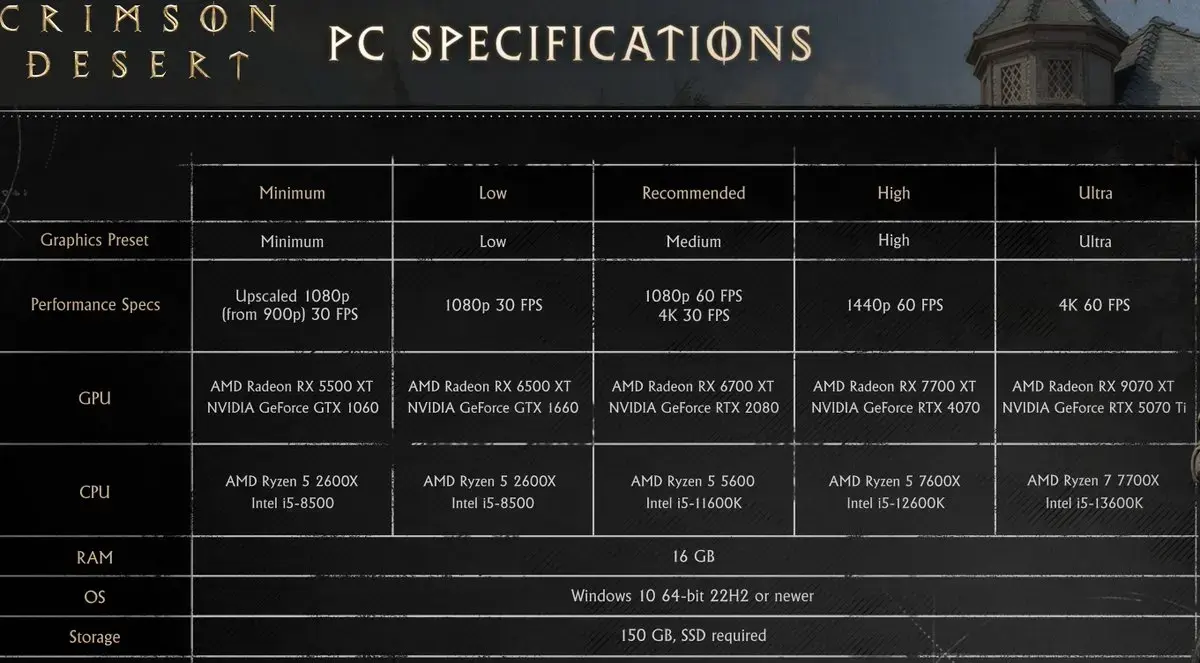
Pearl Abyss published the following official minimum and recommended specifications for Crimson Desert on PC.
| Tier | GPU | CPU | RAM | VRAM | Target |
|---|---|---|---|---|---|
| Minimum | GTX 1060 / RX 580 | i5-8400 / Ryzen 5 2600 | 16 GB | 6 GB | 1080p / 30 fps / Low–Medium preset |
| Recommended | RTX 3060 Ti / RX 6700 XT | i5-11600K / Ryzen 5 5600X | 16 GB | 8 GB | 1440p / 60 fps / High preset |
| High-End | RTX 5070 Ti / RX 9070 XT | Ryzen 7 7700X / i5-13600K | 16 GB | 12 GB+ | 4K / 60 fps / Ultra High + RT |
| Cinematic | RTX 5080+ / RX 9070 XT+ | Ryzen 9 9850X3D | 32 GB | 16 GB+ | 4K / 40–50 fps / Path Tracing |
The official Ultra High preset was demonstrated running at 4K/60 fps. Path Tracing (Cinematic preset) requires upscaling technology to approach 60 fps even on top-tier hardware.
Per-Setting Benchmark: Which Options Actually Cost Frames
Benchmark platform: RTX 5060 Ti 16 GB, Ryzen 7 9800X3D, 32 GB DDR5-6000, 1440p native. Values represent the FPS difference between the tested setting and the Cinematic baseline.
| Setting | Option Tested | FPS Impact vs. Cinematic | Recommendation |
|---|---|---|---|
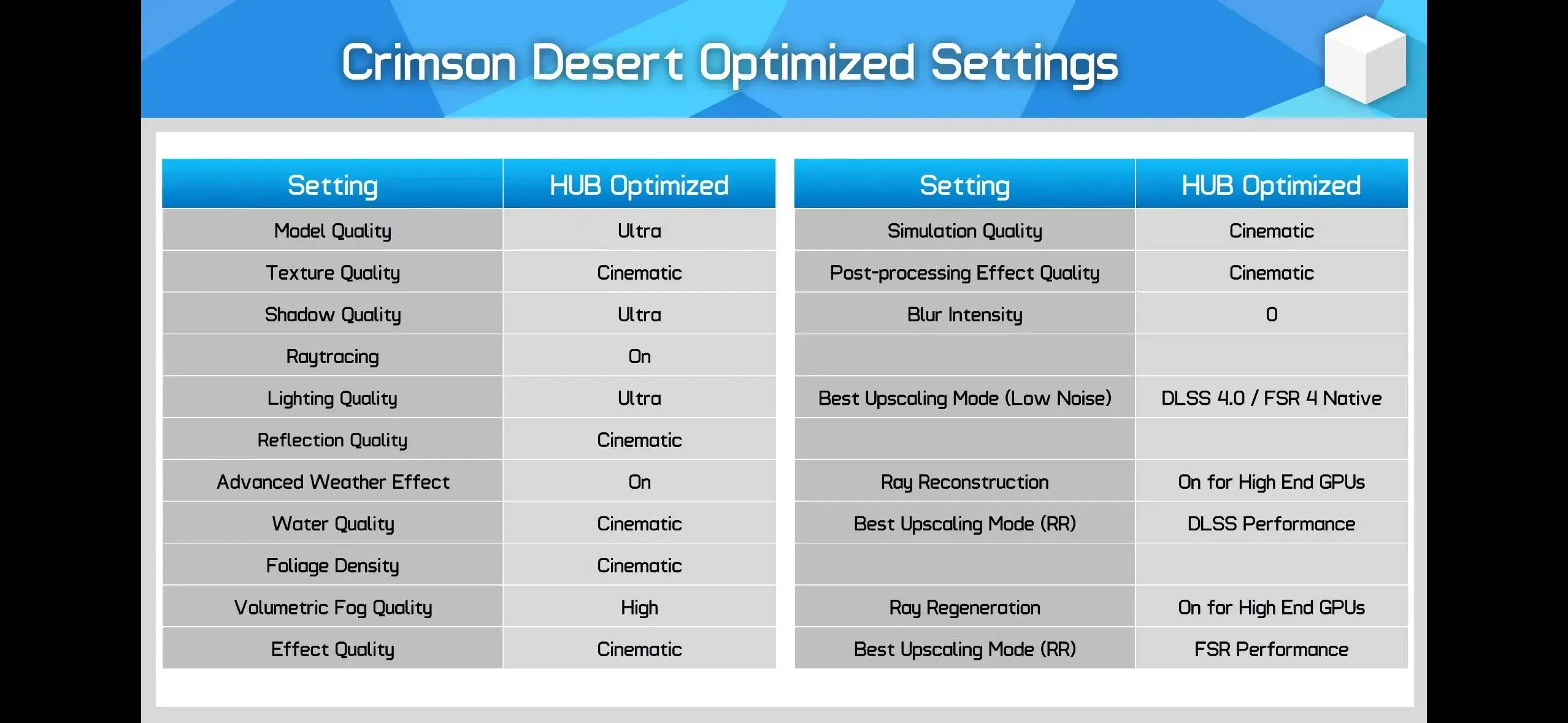
| Lighting Quality | Ultra (not Max/Cinematic) | +36% at Max → Ultra | Use Ultra. Biggest single gain in the game. Cinematic lighting costs 36% of frame budget. |
| Lighting Quality | Ultra preset | +9–10% vs. High | Ultra is the sweet spot |
| Model Quality | Ultra | +4% vs. Cinematic | Keep at Ultra; visual loss is negligible |
| Model Quality | Low | +9% vs. Cinematic | Noticeable pop-in at Low; not recommended |
| Shadow Quality | Ultra | +2% vs. Cinematic | Keep at Ultra; Low/Medium causes flickering |
| Foliage Density | Low | +4% vs. Cinematic | Below Medium causes visible flora reduction |
| Foliage Density | Medium | +3% vs. Cinematic | Acceptable compromise |
| Volumetric Fog | High | +2% vs. Cinematic | Nearly identical visually |
| Reflection Quality | Any below Cinematic | ≤2% gain | Keep at Cinematic; performance cost is negligible |
| Texture Quality | Any | 0–1% | Set by VRAM: 6 GB → Low/Med; 8–10 GB → High; 12 GB+ → Ultra |
| Water Quality | Any below Ultra | 0–1% | Keep at Cinematic; virtually free visual upgrade |
| Ray Tracing | Off | ~0% gain | Do not disable. Engine relies on RT; disabling degrades lighting without recovering frames. |
| Ray Reconstruction | On | −66% FPS | Enable only on RTX 50/40 series with sufficient headroom |
Key takeaway: The only settings that materially affect frame rate are Lighting Quality and, to a lesser extent, Model Quality and Foliage Density. Everything else is effectively free at Ultra or Cinematic.
Three-Tier Configuration Tables: Low, Mid, and High-End Builds
Low-End Configuration
Target: 1080p / stable 30–45 fps. Hardware: GTX 1060 / RX 580 class, 6 GB VRAM.
| Setting | Value | Rationale |
|---|---|---|
| Screen Mode | Fullscreen | Lowest input overhead |
| Resolution | 1080p (1920×1080) | Native resolution baseline |
| Upscaling | DLSS Quality / FSR 4.0 Quality | Significant FPS recovery |
| Frame Generation | Off | Adds latency without Reflex/Anti-Lag support on older GPU |
| Model Quality | Low | +9% FPS; accept minor pop-in |
| Texture Quality | Low / Medium | Set to VRAM capacity |
| Shadow Quality | Medium | Minimum acceptable; below this causes artifacts |
| Lighting Quality | Ultra (not Cinematic/Max) | Most critical setting; do not set higher |
| Ray Tracing | On | Keep on; disabling gives no real FPS benefit |
| Ray Reconstruction | Off | Costs 66% FPS; not viable on low-end |
| Reflection Quality | High | Minimal FPS cost |
| Advanced Weather | Off | Saves measurable overhead |
| Water Quality | Ultra | Free visual quality |
| Foliage Density | Low | +4% FPS; accept reduced vegetation |
| Volumetric Fog | High | +2% FPS; visually near-identical to Cinematic |
| VFX Quality | High | Minor cost |
| Simulation Quality | High | Minor cost |
| Post-Processing | High | Minor cost |
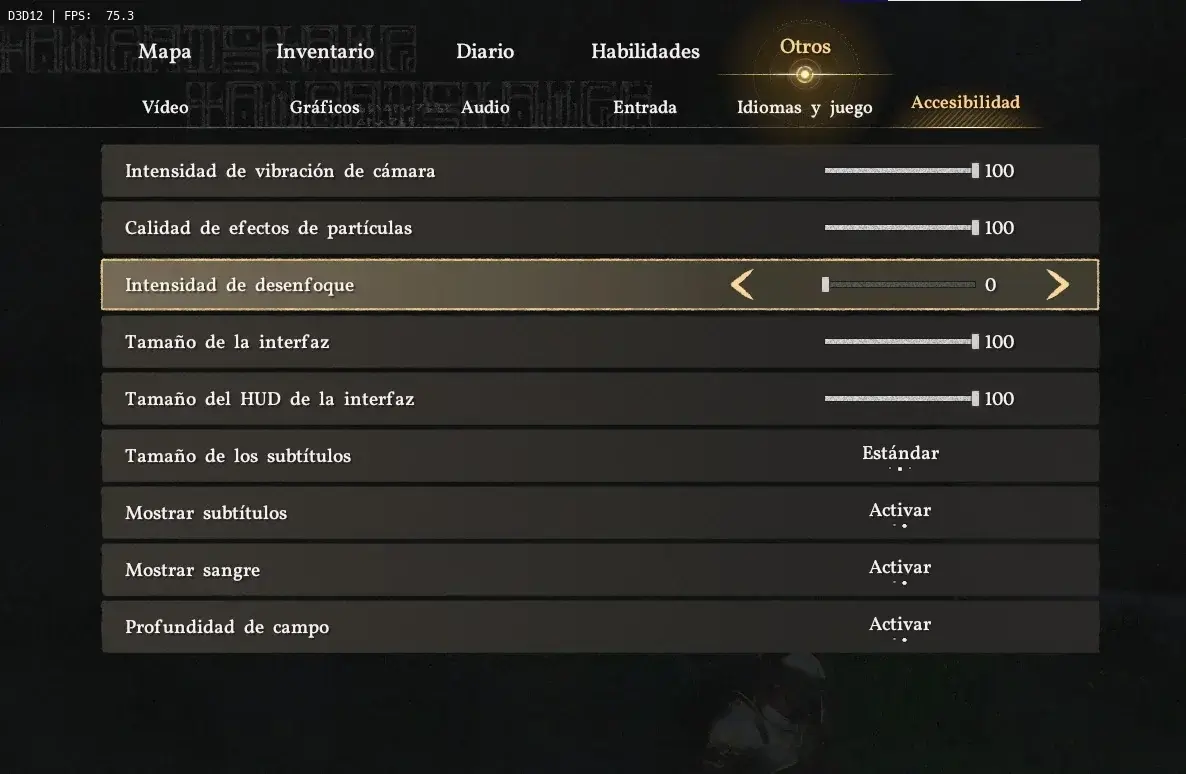
| Motion Blur | 0 | Disable for clarity and minor gain |
Mid-Range Configuration
Target: 1440p / 60 fps. Hardware: RTX 3060 Ti / RX 6700 XT class, 8–10 GB VRAM.
| Setting | Value | Rationale |
|---|---|---|
| Screen Mode | Fullscreen | |
| Resolution | 1440p (2560×1440) | |
| Upscaling | DLSS 4.0 Quality / FSR 4.0 Quality | DLSS 4.0 preferred over 4.5 (less noise) |
| Frame Generation | Optional with Reflex/Anti-Lag | Only if latency is acceptable |
| Model Quality | Ultra | No meaningful cost |
| Texture Quality | High | 8 GB VRAM tier |
| Shadow Quality | Ultra | Minimal cost; keeps shadows clean |
| Lighting Quality | Ultra | Do not move to Cinematic/Max |
| Ray Tracing | On | |
| Ray Reconstruction | Off | |
| Reflection Quality | Cinematic | Free |
| Advanced Weather | On | Acceptable at this tier |
| Water Quality | Cinematic | Free |
| Foliage Density | High | Balanced; avoid Ultra if frame budget is tight |
| Volumetric Fog | High | −2% vs. Cinematic, virtually no visual change |
| VFX Quality | Cinematic | |
| Simulation Quality | Ultra | |
| Post-Processing | Cinematic | |
| Motion Blur | 0 |
High-End Configuration
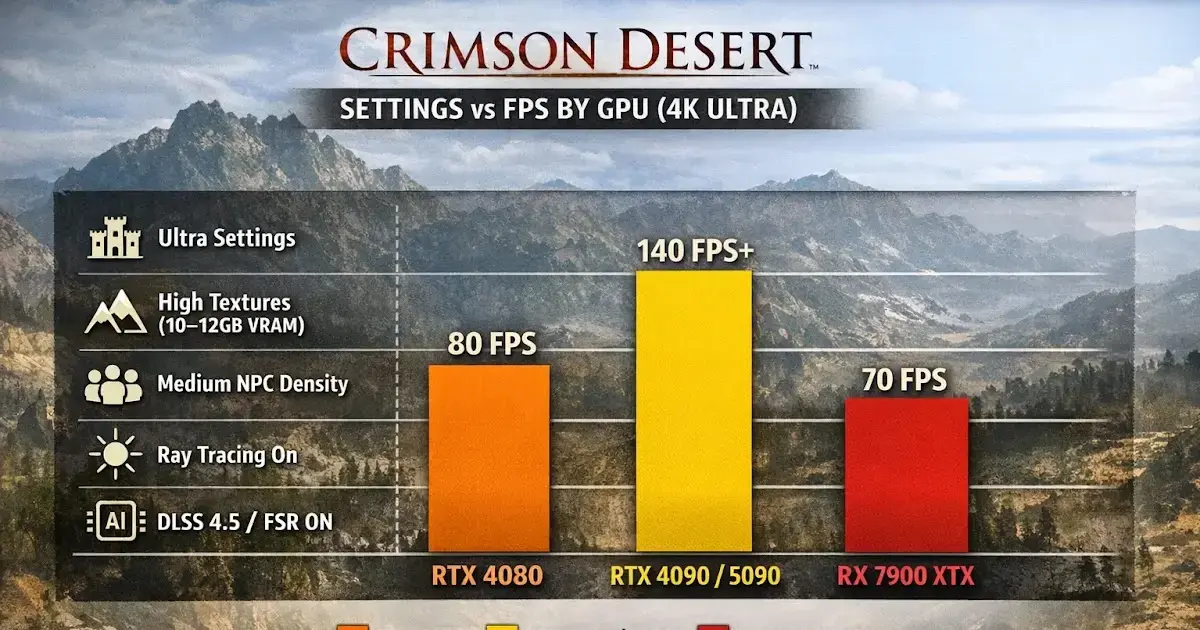
Target: 4K / 60 fps. Hardware: RTX 5070 Ti / RX 9070 XT, 12 GB+ VRAM.
| Setting | Value | Rationale |
|---|---|---|
| Screen Mode | Fullscreen | |
| Resolution | 4K (3840×2160) | |
| Upscaling | DLSS 4.0 Quality or DLAA | DLAA for maximum native-res quality |
| Frame Generation | On (with Reflex) | RTX 50/40 series: latency offset by Reflex |
| Model Quality | Ultra | |
| Texture Quality | Cinematic | 12 GB+ VRAM |
| Shadow Quality | Ultra High | |
| Lighting Quality | Ultra | Still do not set to Cinematic unless targeting 40 fps |
| Ray Tracing | On | |
| Ray Reconstruction | Optional | Only if frame budget has headroom after 4K upscaling |
| Reflection Quality | Cinematic | |
| Advanced Weather | On | |
| Water Quality | Cinematic | |
| Foliage Density | Cinematic | |
| Volumetric Fog | High | Minor saving with no visual cost |
| VFX Quality | Cinematic | |
| Simulation Quality | Cinematic | |
| Post-Processing | Cinematic |
DLSS, FSR, and Frame Generation: What to Enable and What to Skip
NVIDIA DLSS Support Matrix
| Feature | Hardware Required | Notes |
|---|---|---|
| DLSS 4 Super Resolution | All RTX (Turing+) | Use Quality mode as baseline |
| DLSS 4 Frame Generation | RTX 40 series | Pairs with Reflex to reduce added latency |
| DLSS 4 Multi Frame Generation | RTX 50 series | Highest throughput; requires Reflex |
| DLAA | All RTX | Native-resolution deep-learning AA; no upscaling |
| Ray Reconstruction | All RTX | Improves RT image quality; high cost — RTX 40/50 recommended |
AMD FSR Support Matrix
| Feature | Notes |
|---|---|
| FSR 4.0 Super Resolution | AI upscaling; comparable to DLSS in quality mode |
| FSR ML Frame Generation | Available on RX 9000 series; pairs with Anti-Lag |
| Ray Regeneration | RT denoising; analogous to DLSS Ray Reconstruction |
| Neural Radiance Cache | Neural-network accelerated lighting; RX 9000 series |
Upscaling Version Guidance
- DLSS 4.5 vs. 4.0 in Crimson Desert: DLSS 4.5 currently produces more temporal noise in this title. Use DLSS 4.0 until a patch resolves the issue.
- FSR 4.0 vs. FSR 3: FSR 4.0 performs comparably to DLSS 4.0 on supported AMD hardware. Use FSR 4.0 if available.
- Frame Generation: Only enable when base framerate is already above 60 fps. Frame Generation at sub-60 base introduces latency artifacts that outweigh the visual gain.
Benchmark-Derived Optimal Configuration (all hardware tiers)
Setting Lighting Quality from Cinematic to Ultra alone yields approximately +18% FPS over the out-of-box Cinematic preset while retaining virtually all visual quality. This is the single highest-return optimization available.
Frequently Asked Questions
Should I turn off Ray Tracing in Crimson Desert to improve FPS?
Counter-intuitively, no. Crimson Desert's engine is built around ray tracing as a core lighting system. Disabling it yields almost no FPS gain while degrading lighting quality noticeably. Keep RT enabled and instead lower Lighting Quality from Cinematic to Ultra — that single change recovers up to 36% of frame time lost at the Cinematic preset.
What is the single most impactful setting to change in Crimson Desert for performance?
Lighting Quality. Dropping it from Cinematic (Max) to Ultra recovers roughly 36% FPS overhead with minimal visual difference. No other individual setting comes close to that gain-to-cost ratio.
Does DLSS 4.5 or DLSS 4.0 perform better in Crimson Desert?
DLSS 4.0 is currently recommended over 4.5 for Crimson Desert. DLSS 4.5 introduces noticeably more visual noise in this title. Use DLSS 4.0 in Quality mode for the best balance. On AMD hardware, FSR 4.0 provides comparable results.
What are the system requirements for Crimson Desert on PC?
Minimum: GTX 1060 / RX 580, i5-8400 / Ryzen 5 2600, 16 GB RAM, 6 GB VRAM — targeting 1080p/30fps on Low-Medium. Recommended: RTX 3060 Ti / RX 6700 XT, i5-11600K / Ryzen 5 5600X, 16 GB RAM, 8 GB VRAM — targeting 1440p/60fps on High preset.
Is Frame Generation worth enabling in Crimson Desert?
Frame Generation adds latency alongside increased frame count. Whether it is worthwhile depends on your hardware tier and sensitivity to input lag. On RTX 40-series and RX 9000-series hardware, pairing it with NVIDIA Reflex or AMD Anti-Lag mitigates the latency cost. On older hardware without latency reduction technology, leave Frame Generation off.
About the author

Editor-in-Chief
Founder and Editor-in-Chief of gameguidesbox.com, began surfing the web in the late 19th century. Passionate about movies, coffee, gaming, and life itself. Favorite games include Titanfall 2, Baldur's Gate 3, Metro, PUBG, and CS2.
You may also like

Crimson Desert Patch Turns Reviews Around After Rocky Launch
Pearl Abyss fixes critical bugs and adds quality-of-life features, pushing Steam reviews from 'Mixed' to 'Mostly Positive' within two weeks.
Crimson Desert's Mixed Launch Reveals the Uncomfortable Truth About Hype Economics
Five million sales and a 30% stock crash happened at the same time. That's not a paradox — it's exactly what happens when years of unchecked hype collides with a game that's good but not transcendent.

Crimson Desert PC Optimization Guide: How to Actually Get Good Performance on Mid-Range Hardware
The BlackSpace Engine is beautiful and unforgiving. Here's how to stop your GPU from crying and actually enjoy Crimson Desert without dropping to single-digit frames in open areas.
Comments